Measure Information Form
Version 2027A
Measure Information Form
| Set Measure ID | Performance Measure Name |
|---|---|
THKR-OP-2a  |
Postoperative Ambulation on Day of Surgery - Hip and Knee Overall |
| THKR-OP-2b |
Postoperative Ambulation on Day of Surgery - Hip |
| THKR-OP-2c |
Postoperative Ambulation on Day of Surgery - Knee |
Evidence supports the safety and effectiveness of early mobilization following total hip and knee arthroplasty. Mobilization within the first 24 hours after surgery is associated with a reduction in hospital length of stay without an increase in the rate of in hospital postoperative adverse events (Guerra et al., 2015). Additionally, evidence from a large multicenter study demonstrates that early mobilization is independently associated with a significant reduction in postoperative complications occurring within 30 days following total hip and knee arthroplasty (Ripollés-Melchor et al., 2020).
Based on recommendations from a Technical Advisory Panel and public comment, this measure was refined to focus on early postoperative ambulation as a more clinically meaningful indicator of mobilization.
Type Of Measure: Process Improvement Noted As: Increase in the rateIncluded Populations:Denominator Statement: Patients undergoing a total hip or total knee replacement.Excluded Populations: None Data Elements:
- Postoperative ambulation (walking) on the day of surgery
- Postoperative ambulation (walking) in the PACU or within 4 hours of discharge from the PACU
Included Populations:Excluded Populations:
- Patients with a CPT® Code with Modifier as defined in Appendix A, Table 14.01b (Total Hip Replacements-OP), or Table 14.02b (Total Knee Replacements-OP), or Table 14.03b (Bilateral Hip Replacements-OP), or Table 14.04b Bilateral Knee Replacements-OP)
Data Elements:
- Patients less than 18 years of age
- Patients with a CPT® Code with Modifier as defined in Appendix A: Table 14.05b (partial hip and partial knee replacements-OP), or Table 14.06b (revision and resurfacing procedures-OP), or Table 14.07b (removal of implanted devices/prostheses-OP)
- Patients with an ICD-10-CM Principal Diagnosis Code or ICD-10-CM Other Diagnosis Code as defined in Appendix A: Table 14.08 (Complication of Internal Fixation Device/Prosthesis), or Table 14.09 (malignant neoplasm of the pelvis, sacrum, coccyx, lower limbs, or bone/bone marrow or a disseminated malignant neoplasm), or Table 14.10 (Fractures)
- Postoperative patients who are admitted to ICU the day of surgery or PACU discharge date
- Patient expired on CPT® Code Procedure Date
- Patient expired on PACU Discharge Date
- Patient left AMA on PACU Discharge Date
- Documented contraindication by physician/APN/PA/nurse/physical therapist/occupational therapist for not ambulating on day of surgery (e.g. nerve block has not worn off, hypotensive upon standing, patient is vomiting)
- Alsuwaylihi, A., O'Connor, D., Joshi, G. P., Kehlet, H., and Lobo, D. N. (2026). Importance of early postoperative mobilization: Comprehensive review. BJS Open, 10 (2), zrag016. https://doi.org/10.1093/bjsopen/zrag016
- Guerra, M. L., Singh, P. J., and Taylor, N. F. (2015). Early mobilization of patients who have had a hip or knee joint replacement reduces length of stay in hospital: A systematic review. Clinical Rehabilitation, 29 (9), 844–854. https://doi.org/10.1177/0269215514558641
- Ripollés-Melchor, J., Abad-Motos, A., Díez-Remesal, Y., Aseguinolaza-Pagola, M., Padin-Barreiro, L., Sánchez-Martín, R., Logroño-Egea, M., García-Orallo, S., Ramirez-Rodriguez, J. M., and POWER2 Study Investigators Group. (2020). Association Between Use of Enhanced Recovery After Surgery Protocol and Postoperative Complications in Total Hip and Knee Arthroplasty in the Postoperative Outcomes Within Enhanced Recovery After Surgery Protocol in Elective Total Hip and Knee Arthroplasty Study (POWER2). JAMA Surgery, 155 (4), e196024. https://doi.org/10.1001/jamasurg.2019.6024
- Wainwright, T. W., Gill, M., McDonald, D. A., Middleton, R. G., Reed, M., Sahota, O., Yates, P., & Ljungqvist, O. (2020). Consensus statement for perioperative care in total hip replacement and total knee replacement surgery: Enhanced Recovery After Surgery (ERAS®) Society recommendations. Acta Orthopaedica, 91 (1), 3–19. https://doi.org/10.1080/17453674.2019.1683790
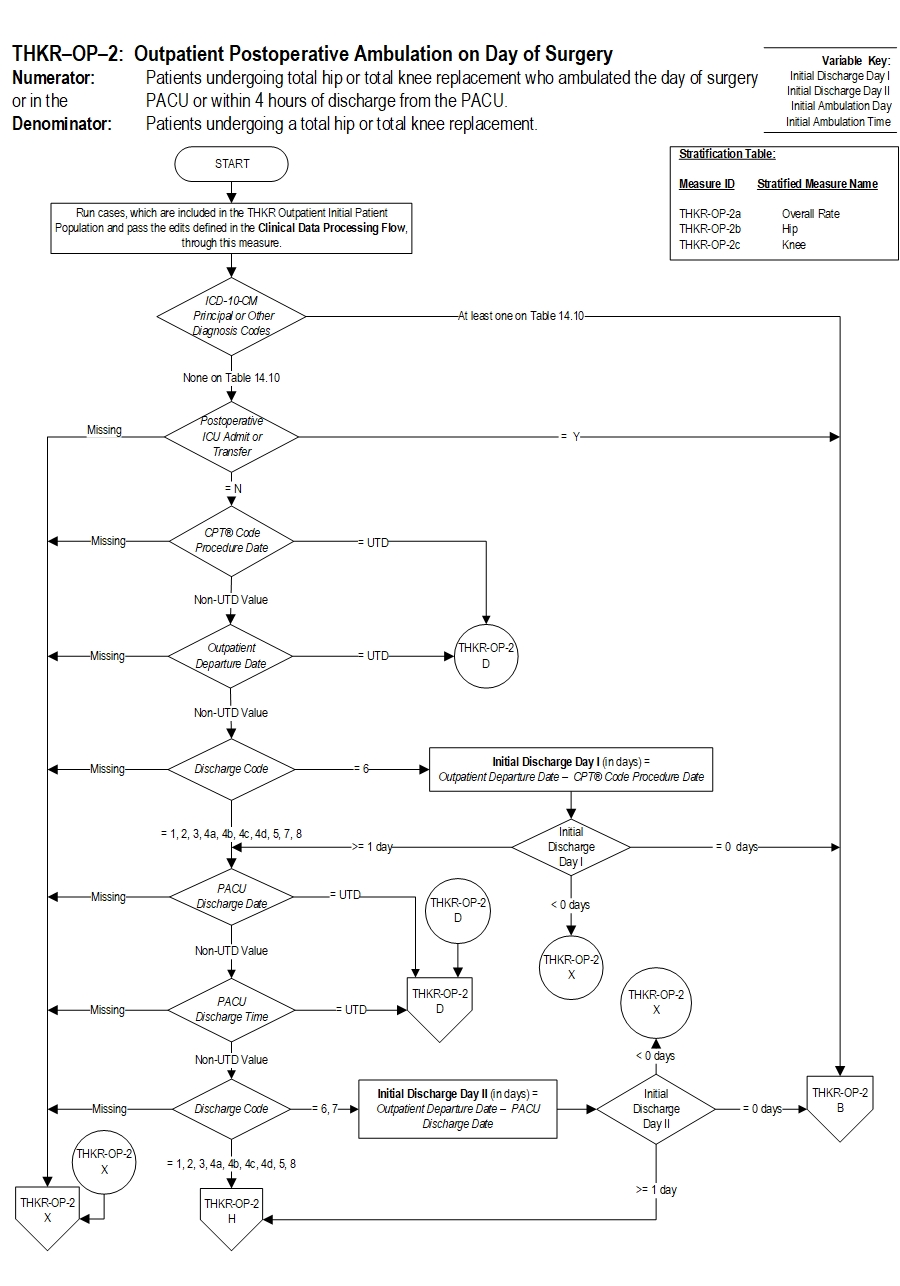
THKR-OP-2: Algorithm Narrative
THKR-OP-2: Outpatient Postoperative Ambulation on Day of Surgery Numerator: Patients undergoing total hip or total knee replacement who ambulated the day of surgery or in the PACU or within 4 hours of discharge from the PACU.
Denominator: Patients undergoing a total hip or total knee replacement.
Variable Key:
Initial Discharge Day I
Initial Discharge Day II
Initial Ambulation Day
Initial Ambulation Time
Stratification Table:
If Measure ID is THKR-OP-2a, then the Stratified Measure Name is Overall Rate.
If Measure ID is THKR-OP-2b, then the Stratified Measure Name is Hip.
If Measure ID is THKR-OP-2c, then the Stratified Measure Name is Knee.
1. Start processing. Run cases, which are included in the THKR Outpatient Initial Patient Population and pass the edits defined in the Clinical Data Processing Flow, through this measure.
2. Check ICD-10 CM Principal or Other Diagnosis Codes
- If at least one of the ICD-10 CM Principal or Other Diagnosis codes is on Table 14.10, the case will proceed to a Overall Rate Category Assignment of B and will not be in the Measure Population.
- If none of the ICD-10 CM Principal or Other Diagnosis codes are on Table 14.10, continue processing and proceed to check Postoperative ICU Admit or Transfer.
- If Postoperative ICU Admit or Transfer is missing, the case will proceed to a Measure Category Assignment of X and will be rejected. Proceed to Step 23.
- If Postoperative ICU Admit or Transfer equals Y, the case will proceed to a Measure Category Assignment of B and will not be in the Measure Population. Proceed to Step 23.
- If Postoperative ICU Admit or Transfer equals N, continue processing and proceed to check CPT Code Procedure Date.
- If CPT Code Procedure Date is missing, the case will proceed to a Measure Category Assignment of X and will be rejected. Proceed to Step 23.
- If CPT Code Procedure Date equals UTD, the case will proceed to a Measure Category Assignment of D and will be in the Measure Population. Proceed to Step 23.
- If CPT Code Procedure Date is Non-UTD value continue processing and proceed to check Outpatient Departure Date.
- If Outpatient Departure Date is missing, the case will proceed to a Measure Category Assignment of X and will be rejected. Proceed to Step 23.
- If Outpatient Departure Date equals UTD, the case will proceed to a Measure Category Assignment of D and will be in the Measure Population. Proceed to Step 23.
- If Outpatient Departure Date is Non-UTD value continue processing and proceed to check Discharge Code.
- If Discharge Code is missing, the case will proceed to a Measure Category Assignment of X and will be rejected. Proceed to Step 23.
- If Discharge Code equals 6, continue processing and proceed to calculate Initial Discharge Day I.
- If Discharge Code equals 1, 2, 3, 4a, 4b, 4c, 4d, 5, 7 or 8, continue processing and proceed to Step 9, to check PACU Discharge Date.
8. Check Initial Discharge Day I
- If Initial Discharge Day I is less than 0 days, the case will proceed to a Measure Category Assignment of X and will be rejected. Proceed to Step 23.
- If Initial Discharge Day I is equal to 0 days, the case will proceed to a Measure Category Assignment of B and will not be in the Measure Population. Proceed to Step 23.
- If Initial Discharge Day I is equal to or greater than 1 day, continue processing and proceed to check PACU Discharge Date
- If PACU Discharge Date is missing, the case will proceed to a Measure Category Assignment of X and will be rejected. Proceed to Step 23.
- If PACU Discharge Date equals UTD, the case will proceed to a Measure Category Assignment of D and will be in the Measure Population. Proceed to Step 23.
- If PACU Discharge Date is Non-UTD value continue processing and proceed to check PACU Discharge Time.
- If PACU Discharge Time is missing, the case will proceed to a Measure Category Assignment of X and will be rejected. Proceed to Step 23.
- If PACU Discharge Time equals UTD, the case will proceed to a Measure Category Assignment of D and will be in the Measure Population. Proceed to Step 23.
- If PACU Discharge Time is Non-UTD value continue processing and proceed to check Discharge Code.
- If Discharge Code is missing, the case will proceed to a Measure Category Assignment of X and will be rejected. Proceed to Step 23.
- If Discharge Code equals 6 or 7, continue processing and proceed to calculate Initial Discharge Day II.
- If Discharge Code equals 1, 2, 3, 4a, 4b, 4c, 4d, 5 or 8, continue processing and proceed to Step 14, to check Ambulation.
13. Check Initial Discharge Day II
- If Initial Discharge Day II is less than 0 days, the case will proceed to a Measure Category Assignment of X and will be rejected. Proceed to Step 23.
- If Initial Discharge Day II is equal to 0 days, the case will proceed to a Measure Category Assignment of B and will not be in the Measure Population. Proceed to Step 23.
- If Initial Discharge Day II is equal to or greater than 1 day, continue processing and proceed to check Ambulation
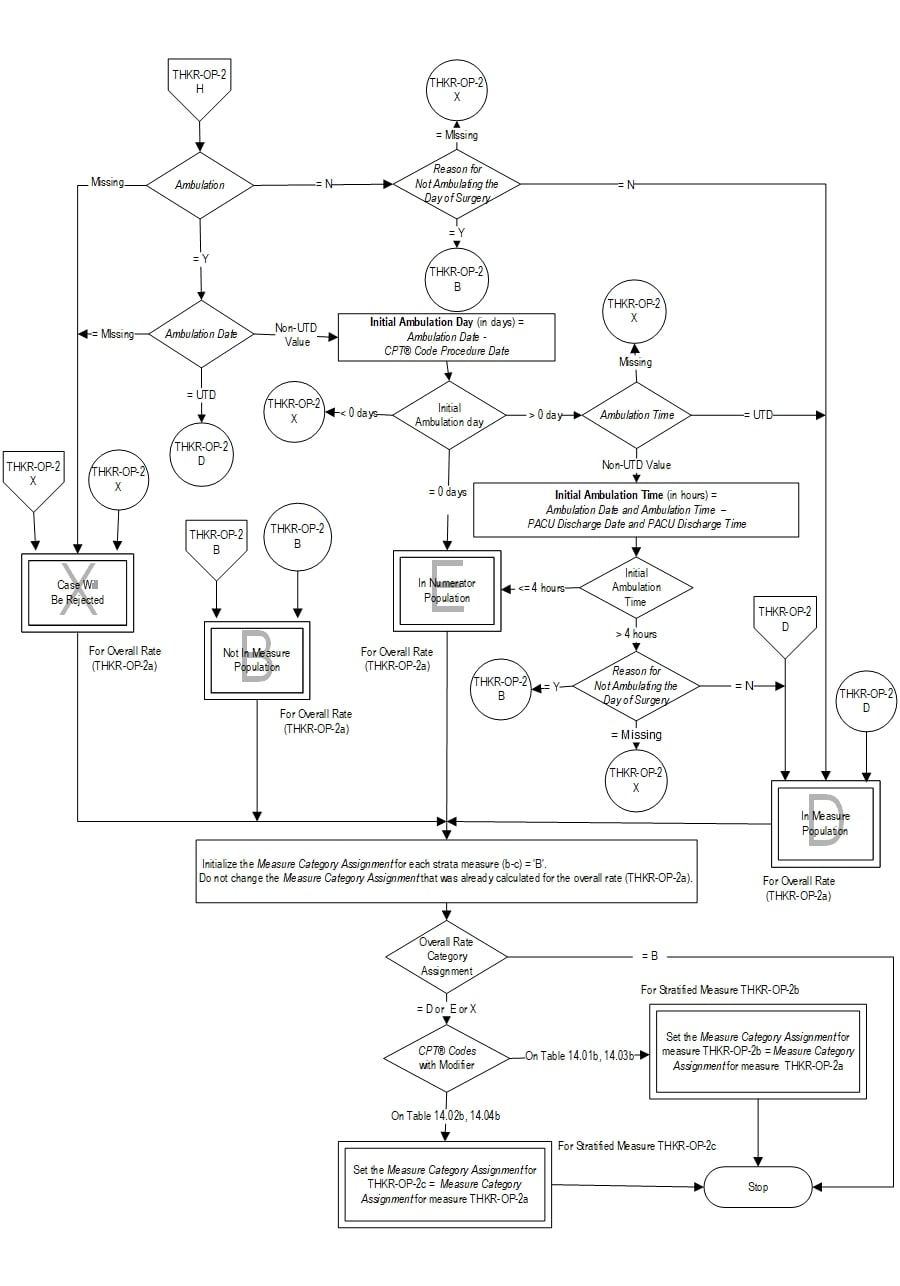
- If Ambulation is missing, the case will proceed to a Measure Category Assignment of X and will be rejected. Proceed to Step 23.
- If Ambulation equals N, continue processing and proceed to check Reason for Not Ambulating the Day of Surgery.
- If Ambulation equals Y, continue processing and proceed to Step 16, to check Ambulation Date.
- If Reason for Not Ambulating the Day of Surgery is missing, the case will proceed to a Measure Category Assignment of X and will be rejected. Proceed to Step 23.
- If Reason for Not Ambulating the Day of Surgery equals N, the case will proceed to a Measure Category Assignment of D and will be in the Measure Population. Proceed to Step 23.
- If Reason for Not Ambulating the Day of Surgery equals Y, the case will proceed to a Measure Category Assignment of B and will not be in the Measure Population. Proceed to Step 23.
- If Ambulation Date is missing, the case will proceed to a Measure Category Assignment of X and will be rejected. Proceed to Step 23.
- If Ambulation Date equals UTD, the case will proceed to a Measure Category Assignment of D and will be in the Measure Population. Proceed to Step 23.
- If Ambulation Date is Non-UTD value continue processing and proceed to calculate Initial Ambulation Day.
18. Check Initial Ambulation Day
- If Initial Ambulation Day is less than 0 days, the case will proceed to a Measure Category Assignment of X and will be rejected. Proceed to Step 23.
- If Initial Ambulation Day is equal to 0 days, the case will proceed to a Measure Category Assignment of E and will be in the numerator population. Proceed to Step 23.
- If Initial Ambulation Day is greater than 0 day, continue processing and proceed to check Ambulation Time
- If Ambulation Time is missing, the case will proceed to a Measure Category Assignment of X and will be rejected. Proceed to Step 23.
- If Ambulation Time equals UTD, the case will proceed to a Measure Category Assignment of D and will be in the Measure Population. Proceed to Step 23.
- If Ambulation Time is Non-UTD value continue processing and proceed to calculate Initial Ambulation Time.
21. Check Initial Ambulation Time
- If Initial Ambulation Time is equal to or less than 4 hours, the case will proceed to a Measure Category Assignment of E and will be in the numerator population. Proceed to Step 23.
- If Initial Ambulation Time is greater than 4 hours, continue processing and proceed to check Reason for Not Ambulating the Day of Surgery
- If Reason for Not Ambulating the Day of Surgery is missing, the case will proceed to a Measure Category Assignment of X and will be rejected. Proceed to Step 23.
- If Reason for Not Ambulating the Day of Surgery equals N, the case will proceed to a Measure Category Assignment of D and will be in the Measure Population. Proceed to Step 23.
- If Reason for Not Ambulating the Day of Surgery equals Y, the case will proceed to a Measure Category Assignment of B and will not be in the Measure Population. Proceed to Step 23.
24. Check Overall Rate Category Assignment.
- If Overall Rate Category Assignment equals B Stop Processing.
- If Overall Rate Category Assignment equals D or E or X continue processing and proceed to check CPT Codes with Modifier.
- If CPT Codes with Modifier is on Table 14.01b or 14.03b, Set the Measure Category Assignment for Measure THKR-OP-2b equal to Measure Category Assignment for Measure THKR-OP-2a. Stop processing.
- If CPT Codes with Modifier is on Table 14.02b or 14.04b, Set the Measure Category Assignment for Measure THKR-OP-2c equal to Measure Category Assignment for Measure THKR-OP-2a. Stop processing.
LICENSE FOR USE OF CURRENT PROCEDURAL TERMINOLOGY, FOURTH EDITION (“CPT®”)
CPT® only copyright 2026 American Medical Association. All rights reserved. CPT® is a registered trademark of the American Medical Association.
You, your employees and agents are authorized to use CPT® only as contained in The Joint Commission performance measures solely for your own personal use in directly participating in healthcare programs administered by The Joint Commission. You acknowledge that the American Medical Association (“AMA”) holds all copyright, trademark and other rights in CPT®.
Any use not authorized herein is prohibited, including by way of illustration and not by way of limitation, making copies of CPT® for resale and/or license, transferring copies of CPT® to any party not bound by this Agreement, creating any modified or derivative work of CPT®, or making any commercial use of CPT®. License to use CPT® for any use not authorized herein must be obtained through the American Medical Association, Intellectual Property Services, AMA Plaza, 330 North Wabash Avenue, Suite 39300, Chicago, Illinois 60611-5885. Applications are available at the American Medical Association Web site, www.ama- assn.org/go/cpt.
U.S. Government Rights This product includes CPT® which is commercial technical data, which was developed exclusively at private expense by the American Medical Association, 330 North Wabash Avenue, Chicago, Illinois 60611. The American Medical Association does not agree to license CPT® to the Federal Government based on the license in FAR 52.227-14 (Data Rights - General) and DFARS 252.227-7015 (Technical Data - Commercial Items) or any other license provision. The American Medical Association reserves all rights to approve any license with any Federal agency.
Disclaimer of Warranties and Liabilities. CPT® is provided “as is” without warranty of any kind, either expressed or implied, including but not limited to the implied warranties of merchantability and fitness for a particular purpose. Fee schedules, relative value units, conversion factors and/or related components are not assigned by the AMA, are not part of CPT®, and the (AMA is not recommending their use. The AMA does not directly or indirectly practice medicine or dispense medical services. The responsibility for the content of this product is with The Joint Commission, and no endorsement by the AMA is intended or implied. The AMA disclaims responsibility for any consequences or liability attributable to or related to any use, non-use, or interpretation of information contained or not contained in this product.
This Agreement will terminate upon notice if you violate its terms. The AMA is a third party beneficiary to this Agreement.
Should the foregoing terms and conditions be acceptable to you, please indicate your agreement and acceptance by clicking below on the button labeled “accept”.